Yingzhi
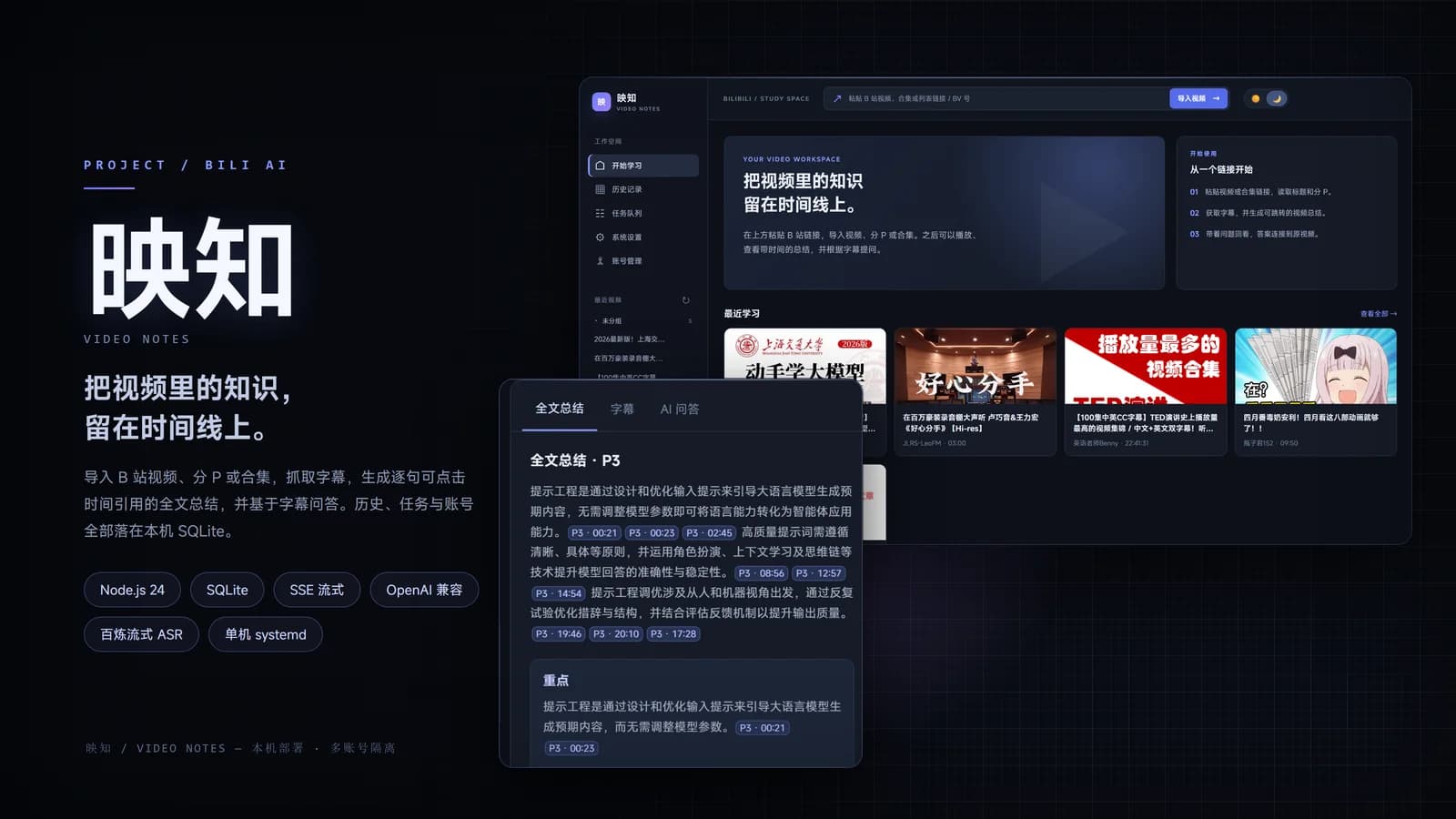
A self-hosted Bilibili study workspace — import videos, parts or collections, fetch subtitles, and get full-text summaries whose every section links to a clickable timestamp, plus subtitle-grounded Q&A
- Year
- 2026
- Status
- Active
- Categories
- ai / web / tool
- Updated
- 2026.10.01
- Node.js 24
- SQLite
- SSE
- OpenAI-compatible
- Alibaba Cloud Bailian
- FFmpeg
- Bilibili
On this page
Overview
Yingzhi (映知) is a self-hosted study workspace for Bilibili videos. Paste a link to a single video, a specific part, or a whole collection, and it resolves the input into a uniform set of resources and parts, embeds the official Bilibili player, fetches subtitles, and then produces a full-text summary in which every section carries clickable time references. You can also ask questions about the current part, the whole video, or a set of selected history items. History, subtitles, summaries, tasks and accounts all live in a local SQLite database.
Unlike the usual order of things, the project's first artifact was not code but an engineering specification (DEVELOPMENT.md): product boundaries, a unified data model, error codes and acceptance criteria were fixed first, and only then were the milestones implemented. The first version deliberately avoids PostgreSQL and vector search — Node.js 24's built-in SQLite keeps the only external dependencies at FFmpeg and the model API.
Problem
Watching long video courses brings three concrete annoyances:
- Summaries have no anchor — a paragraph-level summary reads fine, but to find out "at which minute was this said?" you have to drag the progress bar and dig around;
- Subtitles are not always there — some videos only have Bilibili's AI subtitles, others have none at all, and you are left relying on memory;
- Chat answers do not map back to the video — a general-purpose chat tool has never seen this video; the answer sounds plausible but cannot be verified.
So V1 solves exactly one thing: every conclusion must lead back to an exact moment in the video. Time points in a summary are back-filled by the server from subtitle segments; timestamps written by the model are treated as candidates only.
Architecture
Browser  vanilla JS SPA (no framework, no build step)
   │  /api/v1  REST + SSE
   ▼
src/server.mjs   HTTP routing · in-app login · per-route rate limits · SSE
   ├─ auth.mjs        accounts, sessions, scrypt passwords
   ├─ bilibili.mjs    link parsing · parts · collections · audio streams
   ├─ ai.mjs          summarisation and Q&A (OpenAI-compatible / plain-text mode)
   ├─ asr-stream.mjs  Alibaba Cloud Bailian streaming ASR (WebSocket)
   └─ rate-limit.mjs  separate limits for import / subtitle / summary / chat
   │
   ├─► src/worker.mjs (child process)  persistent task queue
   └─► data/study.sqlite (WAL)
         resources · parts · transcripts · summaries · chats · tasks · accounts
The front end pulls in no framework and no build chain: under public/ there is exactly one index.html, one app.js and one style.css. Apart from the bundled FFmpeg binary the project has no third-party runtime dependency.
Features
- Sentence-level time references — summaries and chat answers place timestamps right after the relevant sentence; clicking one seeks the embedded player to that moment. If the reference belongs to another part, that part is loaded first. An older summary can be regenerated as a sentence-level version with one click.
- Subtitles first, transcription as fallback — Bilibili's human subtitles and AI subtitles are tried in order; when neither exists, Alibaba Cloud Bailian streaming ASR can be configured. The bundled FFmpeg converts audio into 16 kHz mono PCM and sentence-level timestamps come back over WebSocket, so the whole-file upload limit does not apply. Misconfiguring a realtime model as the transcription model is rejected on save.
- Batch runs and a task queue — from the library or a collection you can select several videos and queue their summaries; every part is enqueued separately, capped at 20 parts per submission, with a warning about possible AI cost before you confirm. Queued tasks can be cancelled, recoverable failures retried, and tasks interrupted by a worker restart are requeued.
- Multi-account with key isolation — members are created by the administrator and each configures their own AI base URL, model and Bilibili
SESSDATA. A personal cookie overrides the server default session and is unreadable by other members; regular members do not inherit the administrator's keys. Sensitive values are only ever sent to the server for storage and are never echoed back to the page. - Library and organisation — search by title, uploader or BV id; your own videos can be filed into custom groups, collapsed, or moved to the recycle bin, while older records are exposed as read-only shared examples.
- Light/dark theme and fonts — a sun/moon slider in the top bar, with a View Transitions circular wipe expanding from the click position; font choice covers MiSans, HarmonyOS Sans or the system Chinese typeface.
- Built for desktop reading — the divider between player and side panel is draggable, can be nudged with the arrow keys and reset with Home, and the width is stored locally; narrow screens fall back to a stacked layout.
Design notes
- Specification before code — the "definition of done" in the spec doubles as the acceptance checklist, which rules out "it runs, so it is finished". Undocumented Bilibili endpoints, signing and page structures stay sealed inside the adapter.
- Time is always stored in milliseconds — the database and API only carry non-negative integer
startMs/endMs; conversion happens only at the URL and display layers, so floating-point seconds cannot drift across layers. - References are back-filled by the server — timestamps emitted by the model are candidates only; the server maps subtitle segment IDs back to real times and checks they fall inside the part's duration. A section without a valid reference is not allowed to reach a "finished" state.
- SQLite instead of PostgreSQL — on a single machine PostgreSQL needs another service and driver;
node:sqliteis used instead with WAL and foreign keys enabled. The schema keepsownerIdto leave the migration path open. - Log and response redaction — logs record lengths and checksums rather than full transcripts, full questions or system prompts; the front-end bundle, SSE stream and error responses are checked for sensitive information.
- No fabricated summary when subtitles are missing — the failure reason and a way to fetch subtitles are shown instead of inventing content from the title.
- Per-route rate limits — import, subtitles, summarisation and chat each have a per-minute ceiling and return 429 when exceeded, avoiding duplicate calls and upstream risk control.
Deployment
The application is self-hosted on a single server and accessed over HTTPS, with login and data-access checks handled by the application. Accounts and data are isolated per user, and sensitive configuration stays server-side. Regular database backups undergo isolated restore, integrity and foreign-key checks.
Status
Three development days from 2026-09-27 to 2026-09-29 and 30 commits: the core workspace flow, the subtitle and streaming-transcription pipeline, sentence-level reference summaries, streaming chat, multi-account isolation, the task queue and the production deployment are all in place, and the daily database backup with isolated restore verification has been accepted on the server. Roughly 2.9k lines of code, including 9 test files.
Roadmap
- Migrate to PostgreSQL to support multiple instances and remote deployment;
- Add embeddings to the retrieval layer rather than relying on keywords alone;
- More fallback paths when the player cannot be positioned reliably;
- Refine mobile interaction (currently desktop-reading first).
A self-hosted instance that requires in-app login, so no public demo entry point is offered.
Changelog
- 2026.09.29
- Summaries and chat switched to sentence-level time references placed after the relevant sentence, seeking the player on click
- Added light/dark theme and font selection, with a View Transitions circular wipe expanding from the click position
- Refined multi-account support, desktop sidebar grouping and system settings
- 2026.09.28
- Integrated Alibaba Cloud Bailian streaming transcription, returning sentence-level timestamps over WebSocket when no subtitles exist
- Implemented multi-account isolation with admin-created members, each holding their own AI key and Bilibili SESSDATA
- Completed single-machine Alibaba Cloud deployment, public write-request origin checks and daily database backup verification
- 2026.09.27
- Established the V1 engineering specification and product boundaries (DEVELOPMENT.md)
- Built the core workspace flow: input parsing, parts and collections, embedded playback and the task queue
Related Projects